03 · Team project · industrial IoT · 2026
Machine-Guard-AI
Predictive maintenance that learns what normal looks like for each machine instead of trusting fixed alarm limits.
- 85%
- accuracy on the held-out test set
- 71%
- of injected faults caught
- 94%
- of normal readings correctly passed
Try it live
See how it works.
Launch film
FilmA launch film made in Remotion. The phone screens are rebuilt from the Android app's Compose code, with illustrative readings. Accuracy figures are measured.
Run the real model
RealReal: the Python model and its scoring. Stand-ins: MQTT and HTTP, which a browser can't reach. The running score settles toward the held-out figures as all 800 test rows are scored.
Run Machine-Guard's real anomaly model
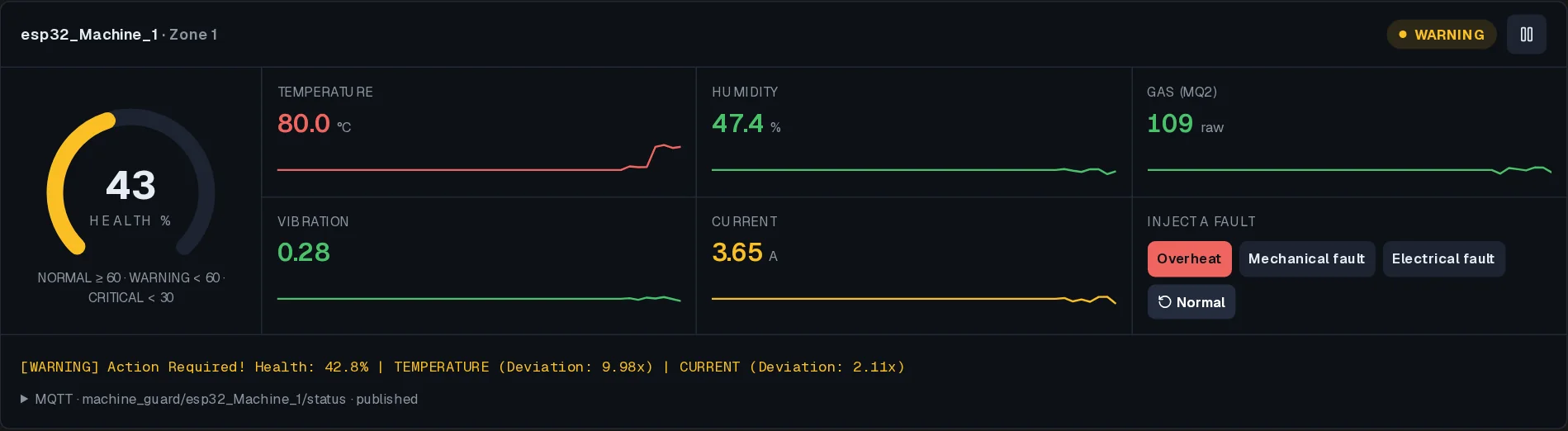
Starts Python with scikit-learn in your browser, loads the real code and datasets from the repo, calibrates and trains, then streams the labelled test set.
Real: machine_guard_core.py runs unchanged in Python (Pyodide) with scikit-learn. Its DeviceManager calibrates on motor_normal_data.csv, trains the IsolationForest, then scores motor_test_data.csv (300 labelled faults, 500 normal). The MQTT and HTTP libraries are replaced with stand-ins that record calls.
Roles and zones
Interactive replicaOwners see every zone; Operators, the on-site workers and supervisors, see only the zone they were allocated. Sign in as each, then trigger an alert and watch who is notified.
Signed in as
What admin can see
OWNERZone 1
Healthy · assets, alerts, insights
Trigger a critical alert
Pick a zone to see who is notified.
Interactive replica of the Android app's role logic (AuthRepository.kt): Owners have no zone restriction; an Operator is allocated one zone at signup; critical SMS alerts go to all Owners plus the Operators of the zone that triggered them (the email alert goes to one configured address). The Kotlin app itself can't run in a browser.
Under the hood
How it works.
Step by step, from the first input to what you see.
ESP32 reads the machine
A DHT11 (temperature, humidity), an MQ2 gas sensor, a vibration interrupt and a current sensor are sampled every 2 seconds and published over MQTT.
- ESP32
- MQTT
Each machine calibrates itself
A new device collects 100 samples (or 5 minutes) as its baseline before monitoring starts.
- calibration
IsolationForest scores every reading
Five scaled features go through an IsolationForest (200 trees). The score maps to a 0–100 health value: below 60 is WARNING, below 30 is CRITICAL.
- scikit-learn
- IsolationForest
It explains itself
Each feature's z-score against the baseline is ranked, so an alert says which sensor moved and by how much, e.g. TEMPERATURE (Deviation: 5.20x).
- z-score
Roles decide who sees what
The Android app has two roles. An Owner has no zone restriction: every zone's assets, alerts and insights, plus Zone Management to add and remove zones. An Operator, the on-site worker or supervisor, picks one zone at signup and sees only that zone.
- Owner
- Operator
- zones
Alerts go to the right people
When health drops below 60, SMS alerts go to every Owner plus only the Operators of the zone that triggered it, and an email goes to the address set in local.properties. Operators in other zones are never texted.
- Kotlin
- Jetpack Compose
- SMS
Role-based access
Owner: every zone, plus Zone Management. Operator: only the zone they were allocated at signup.
Zone-aware alerts
Critical alerts reach all Owners and the Operators of the affected zone, nobody else.
Explains itself
Each alert names the sensor that moved and by how much, such as TEMPERATURE (Deviation: 5.20x).
Learns each machine
Calibrates on 100 samples per device, so thresholds are never hard-coded.
Honest notes
What broke, and what changed
SMS alerts existed but never fired
In a review on 7 Nov 2026 the SMS sender turned out never to be called, and the role-based recipient list was unused. Both are now wired in: a critical reading texts every Owner plus the Operators of that zone.
Email and SMS used different thresholds
Email alerted below 30 and SMS below 60. Both now use 60, matching the documented behaviour.
The MQTT link didn't recover
The message handler was attached after connecting, so early messages were dropped, and a lost connection never reconnected or re-subscribed. The handler is now set first, with automatic reconnect and re-subscribe.
Still open
Accounts created in the app live in memory and are lost on restart, and the fixes above were written without an Android SDK to compile against.
Built with
- Python
- scikit-learn
- Flask
- MQTT
- ESP32
- Kotlin
- Jetpack Compose
- Firebase